 Lynkin
लॉगिन एक्सेस दिए बिना LinkedIn को ऑटोमेट करें
Lynkin कैंपेन, सूचियाँ, इनबॉक्स और एनालिटिक्स के लिए एक वेब ऐप है — और एक Chrome companion जो आपके खुले LinkedIn टैब पर कार्य चलाता है। LinkedIn पासवर्ड क्लाउड में नहीं। Cookie farming नहीं।
- LinkedIn पासवर्ड क्लाउड में नहीं
- ऐप + Chrome companion
- जोखिम सीमा और warm-up अंतर्निहित
परिणाम चाहने वाले ऑपरेटरों के लिए
चलता outreach, एक जगह जवाब, और एनालिटिक्स जो बताते हैं आगे क्या सुधारें। हम execution को सुरक्षित कैसे रखते हैं.
वास्तव में चलने वाला outreach
आप काम करते रहें — आमंत्रण, प्रतीक्षा और follow-up मानवीय गति से चलते रहते हैं।
जवाब एक इनबॉक्स में
बातचीत Lynkin में sync होती है — tag, snooze और loop बंद करें, LinkedIn टैब chaos के बिना।
जानें क्या convert होता है
स्टेप funnel और lifecycle analytics आमंत्रण, accept और reply दिखाते हैं — कमज़ोर स्टेप जल्दी ठीक करें।
मूल्य निर्धारण
Trial, Personal, Business और Enterprise — व्यक्तियों और टीमों के लिए एक कैटलॉग। LinkedIn seats शुरू से स्पष्ट।
Trial
3 दिन · card नहीं
1 LinkedIn seat
एक LinkedIn account पर companion workflow test करें।
- 1 LinkedIn seat
- 1 active campaign
- Gentle invite pacing (~20/दिन)
- Linear sequences · inbox · basic analytics
- Risk limits और warm-up controls
- Sign up पर personal या org workspace
Personal
प्रति माह · license key
3 LinkedIn seats तक
Real outreach volume वाले operators के लिए।
- 3 LinkedIn seats तक
- 10 active campaigns
- Accept / Reply forks
- Smart segments · advanced extracts
- Bulk tools (withdraw, accept invites)
- Gentle invite pacing (~80/दिन)
Business
प्रति माह · license key
15 LinkedIn seats तक
Serious pipeline teams के लिए full platform.
- 15 LinkedIn seats तक
- Unlimited active campaigns
- Personal की सब कुछ
- Webhooks · HubSpot / Sheets hooks
- AI message assist
- Gentle invite pacing (~150/दिन)
Enterprise
annual contract · custom license
Custom LinkedIn और member seats
Volume seats, org workspaces, security review और dedicated onboarding.
- Custom LinkedIn seat packages (25+)
- Org member seats और shared workspace
- Business की सब कुछ
- Dedicated onboarding और priority support
- Security review · MSA · optional SSO
- Custom risk limits और procurement docs
ट्रायल के लिए कार्ड नहीं · /payment पर demo checkout · Personal / Business keys · Enterprise custom
Companion-first vs क्लाउड बॉट
Lynkin control plane (वेब ऐप) को execution (आपका Chrome टैब) से अलग करता है। क्लाउड टूल आमतौर पर दोनों remote infrastructure से चलाते हैं।
विस्तृत तुलना देखें: Expandi, Dux-Soup, HeyReach और अन्य, या पढ़ें हम कैसे संभालते हैं security और companion execution.
वर्कफ़्लो देखें
ऐप में योजना। खुले LinkedIn टैब पर execution। मापें क्या convert होता है।
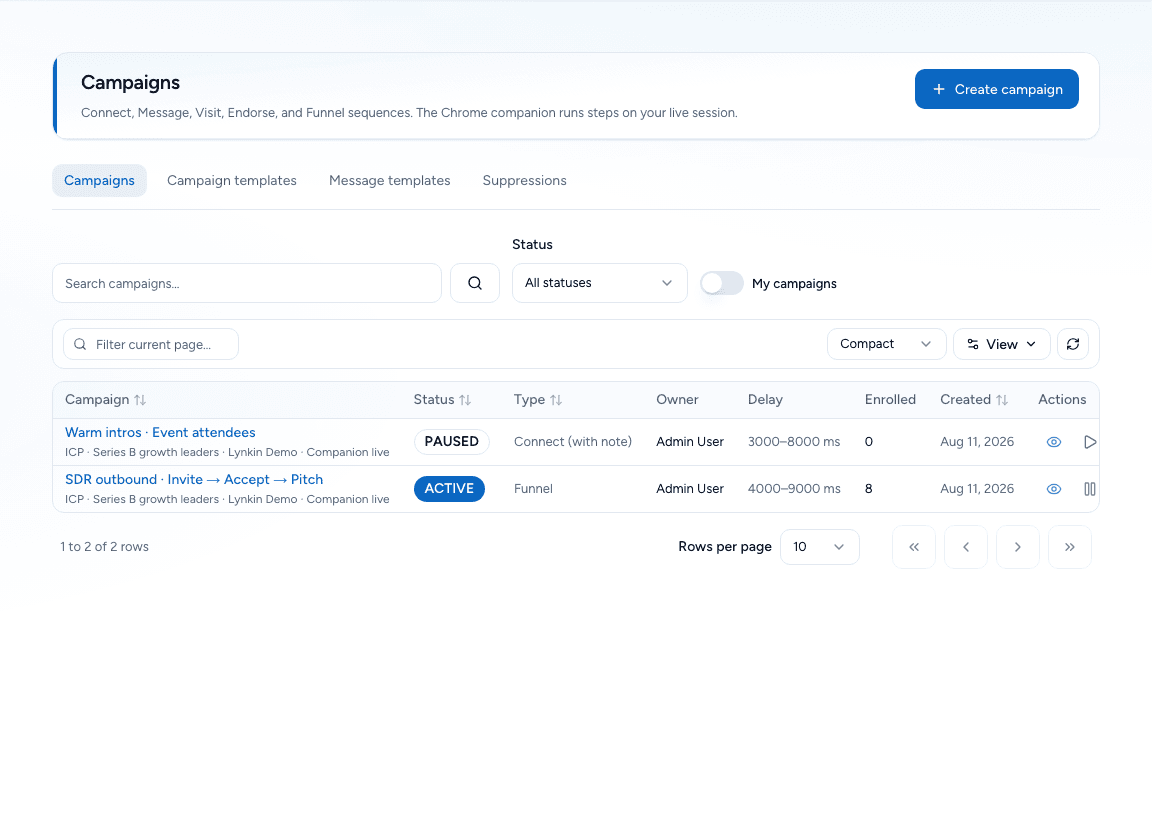
campaigns
वास्तविक शाखाओं वाला campaign builder
Invite, wait, Accept/Reply forks, messages, visits और engage steps — ऐप में design, companion execute करता है।
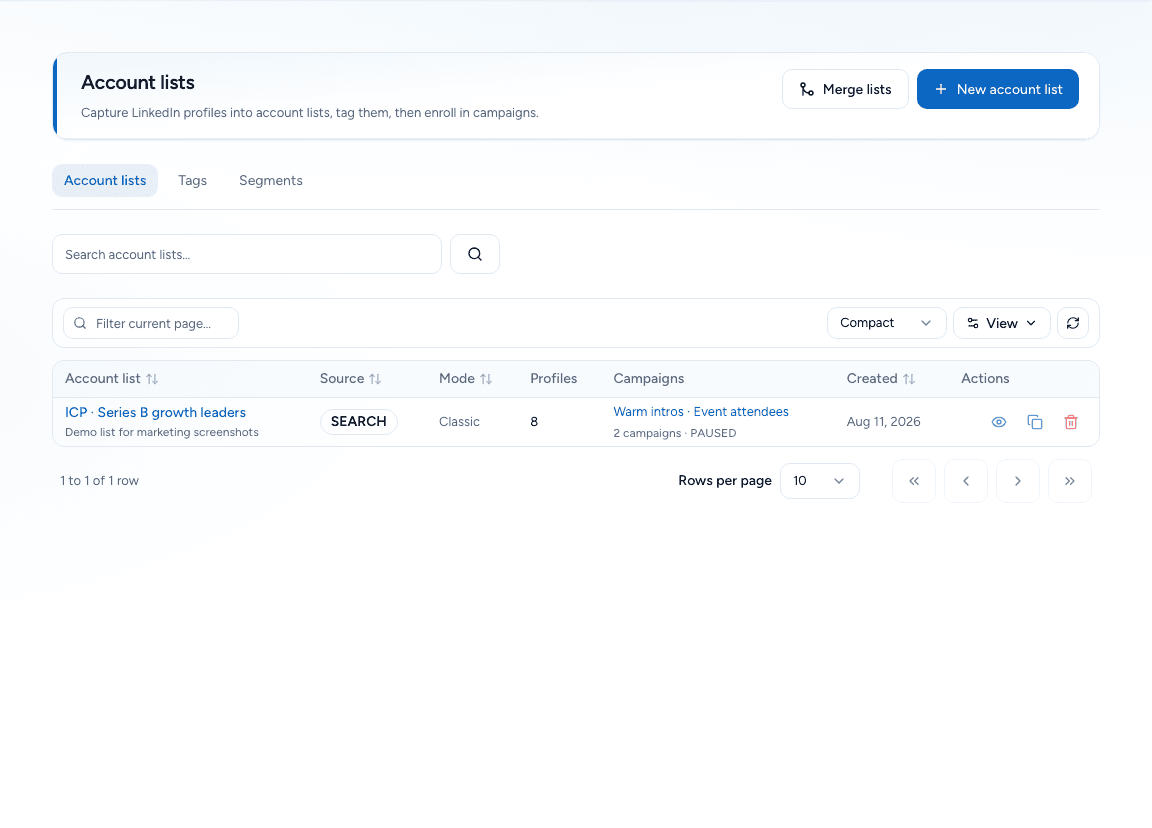
lists
LinkedIn से lists और extracts
Search, posts, groups, events, who-viewed और connections से capture — फिर campaigns में enroll।
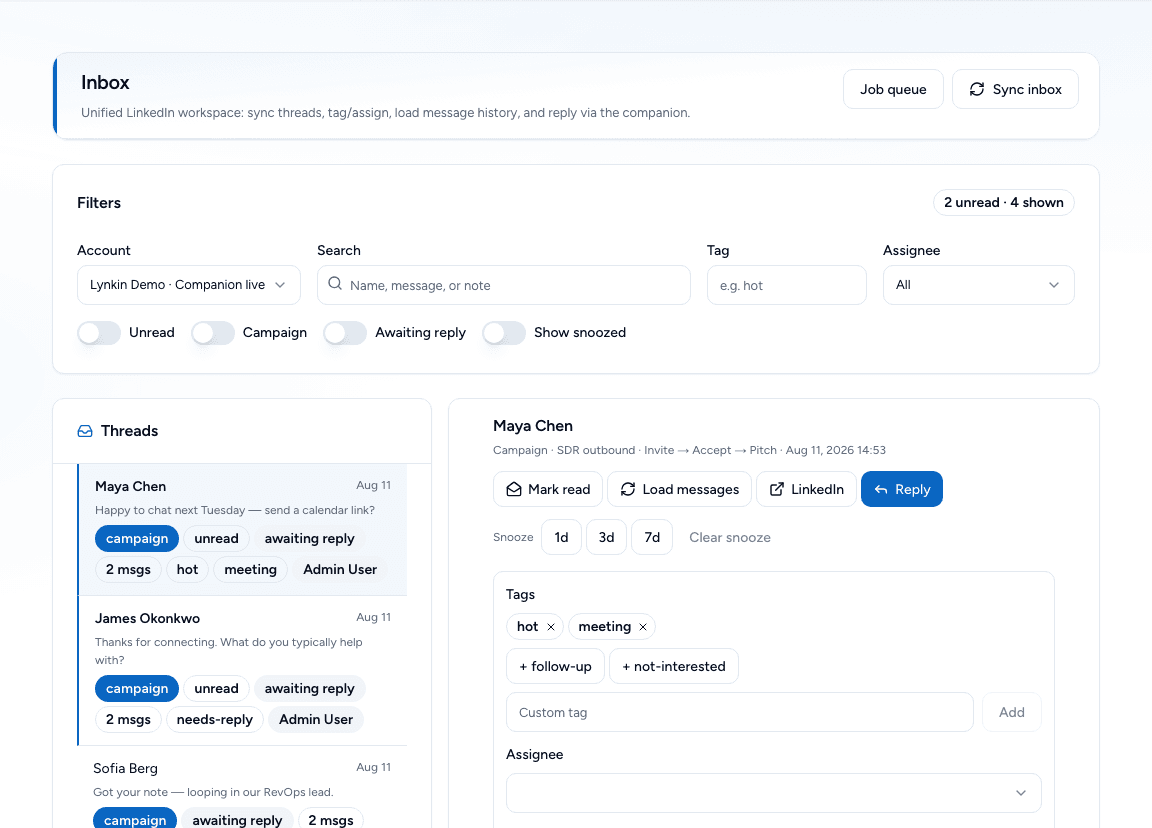
inbox
Unified inbox CRM
Tags, notes, assignee और snooze के साथ synced threads — हर reply का owner।
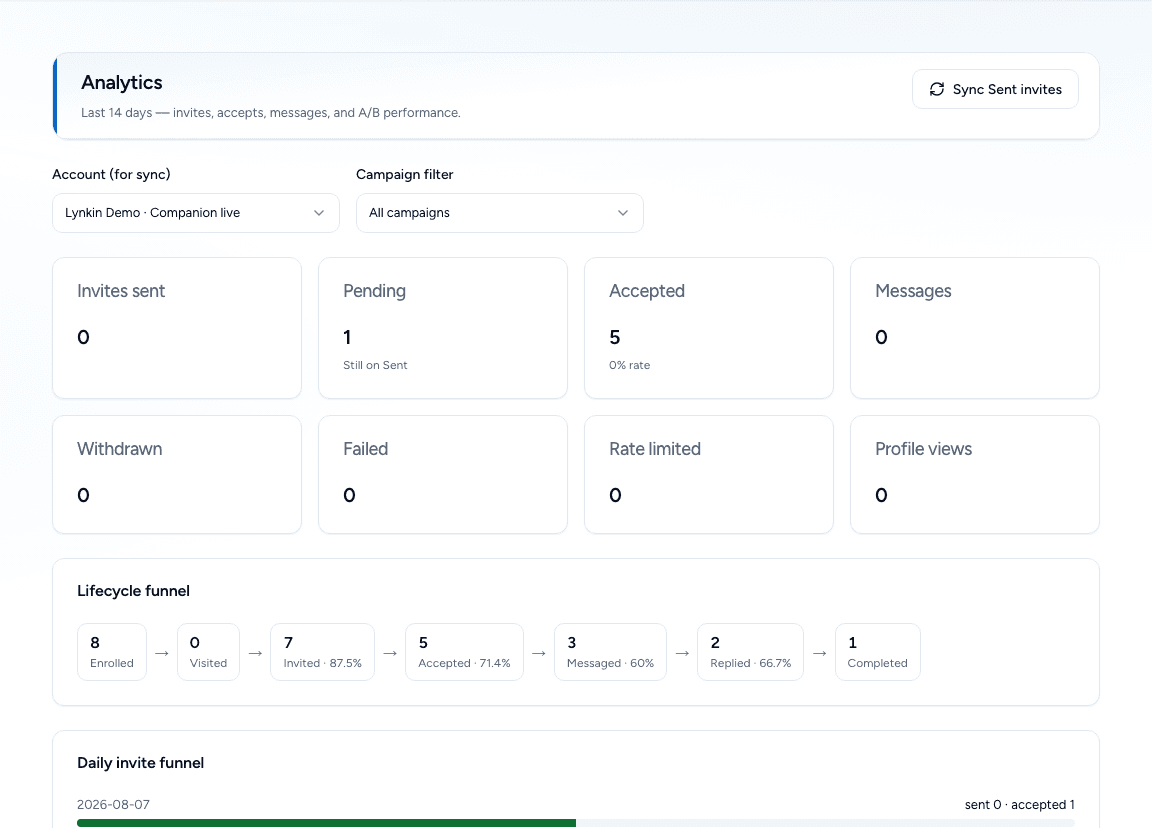
analytics
ऑपरेटरों के लिए lifecycle analytics
Enrolled → invited → accepted → messaged → replied — देखें कौन सा step ठीक करना है।
फ़ीचर
क्लाउड login farm के बिना LinkedIn outreach के लिए सब कुछ।
Invites और withdraw
Personalized notes, soft daily pacing, और bulk withdraw जब clean slate चाहिए।
Accept / Reply forks
Accept या reply के बाद branch — interested leads को pitch, silent ones को अलग path।
Visit और engage
Profile visits, likes, comments, endorsements और group actions — अभी भी आपके tab में।
Smart extracts
Search, posts, events, groups, who-viewed और connections से leads निकालें।
Inbox CRM
Tags, notes, assignees, snooze — LinkedIn messaging में जीते बिना loops बंद करें।
Risk और warm-up
Caps, company throttles, Activity Control, risky runs से पहले canary checks।
ऐप + Chrome companion
ऐप दिमाग है। companion आपके खुले LinkedIn tab के हाथ हैं।
वेब ऐप
Plan, enroll और pipeline manage करें
Lists बनाएँ, sequences design करें, funnels track करें, unified inbox CRM में replies — सब lynkin.app पर।
- Campaigns और Accept/Reply branches
- Lists, segments और extracts
- Tags और snooze वाला inbox CRM
- Risk caps, warm-up, analytics
Chrome companion
अपनी वास्तविक LinkedIn session पर execute
एक बार pair करें, LinkedIn खुला रखें — companion jobs लेता है: invites, messages, visits, engages, withdraws — मानवीय गति से।
- आपके Chrome tab में चलता है
- LinkedIn पासवर्ड क्लाउड में नहीं
- Activity Control और daily pacing
- Risky runs से पहले canary checks
ट्रायल शुरू करने के बाद Chrome companion install और pair करें: Companions
मुफ़्त ट्रायल शुरू करेंLynkin की तुलना
देखें companion-first execution क्लाउड LinkedIn automation tools से कैसे अलग है।
vs Expandi
Cloud LinkedIn automation vs companion-first execution
Lynkin runs actions through a Chrome companion on your live LinkedIn tab — no LinkedIn password to the cloud.
तुलना पढ़ेंvs Dux-Soup
Extension scraping/outreach vs full campaigns + inbox CRM
Lynkin pairs companion execution with campaigns, lists, inbox, analytics, warm-up, and risk caps in one app.
तुलना पढ़ेंvs HeyReach
Agency seat scaling vs safer companion execution
Lynkin emphasizes companion-first automation so client LinkedIn passwords are not stored to run cloud jobs.
तुलना पढ़ेंExplore LinkedIn automation guides
Compare architectures, browse alternatives, and read how companion-first safety works.
अक्सर पूछे जाने वाले प्रश्न
क्या मैं Lynkin को अपना LinkedIn पासवर्ड देता/देती हूँ?
नहीं। आप Chrome में LinkedIn पर logged in रहते हैं। companion उस tab में चलता है। Lynkin को क्लाउड में jobs execute करने के लिए आपका LinkedIn पासवर्ड कभी नहीं चाहिए।
क्या Chrome companion ज़रूरी है?
Execution के लिए हाँ। वेब ऐप campaigns plan करता है और jobs queue करता है; companion Chrome या Firefox में claim और run करता है। Signup के बाद Docs → Browser extension से download करें, फिर Companions से pair करें।
क्या मुफ़्त trial है?
हाँ — 3 दिन, कार्ड नहीं, एक LinkedIn account। बाद में Personal या Business license key से upgrade।
Expandi / क्लाउड tools से कैसे अलग?
वे products आमतौर पर cloud infrastructure से outreach चलाते हैं। Lynkin companion-first है: आपका browser session executor है। ऐप control plane है।
क्या teams एक workspace share कर सकती हैं?
हाँ। Organization plans member seats, LinkedIn seats और ORG_ADMIN / ORG_MEMBER roles shared workspace switcher के साथ जोड़ते हैं।
Paid license कहाँ मिले?
/payment पर checkout preview, या Personal, Business, Enterprise key (individual या org) के लिए contact करें। Licenses या org console में redeem। Real card billing जल्द।